Home › Workday autofill
Autofill Workday job applications in Chrome
Workday application forms are the longest in hiring — multi-page, re-entering the resume you just uploaded, then the same eligibility questions every company asks. ApplyCandid fills the factual ones from a profile you save once, and leaves anything it cannot identify blank rather than guessing.
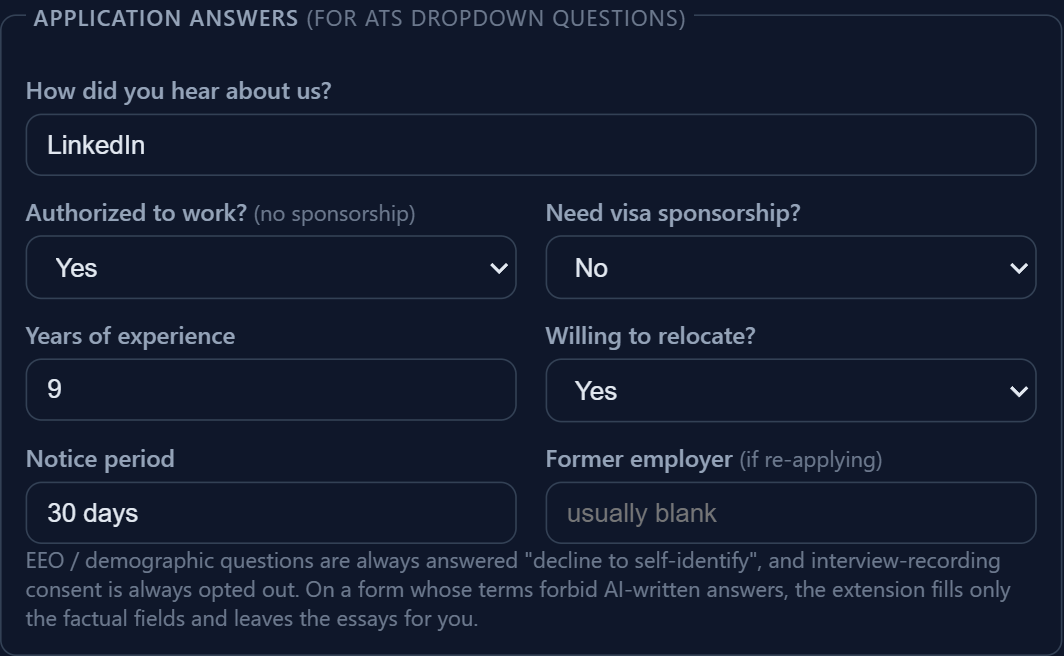
What actually gets filled on a Workday form
Workday requisitions are hosted on each employer's own subdomain — myworkdayjobs.com and myworkdaysite.com — and every employer configures its own question set. There is no single "Workday form" to hard-code against. ApplyCandid handles that by matching fields on what they say rather than where they sit:
- Contact and identity fields — name, email, phone, city, location, LinkedIn and portfolio URLs — matched from your saved profile and filled instantly, with no AI call and nothing leaving your browser.
- Eligibility dropdowns — work authorization, visa sponsorship, years of experience, notice period, willingness to relocate. These are the questions that hard-filter an application before a human sees it, and keeping them consistent across every form is most of the value.
- Type-to-search comboboxes — the custom dropdowns Workday uses instead of a plain
<select>, whose option list stays empty until you type into it. These are handled explicitly; a naive autofill tool silently skips them. - Open-ended questions — "why do you want to work here", cover letters, additional information. These are drafted by AI, grounded in your parsed resume and the job description, not filled from a template.
Nothing is submitted for you on Workday. External ATS forms are always left filled and unsubmitted — you read what is there and click Submit yourself. Auto-submit exists only for Easy Apply flows, is off by default, and is capped per day when enabled.
Fields it will not fill
A field ApplyCandid cannot confidently identify is left blank. It is never filled with a plausible-looking guess, because a wrong answer on an eligibility question is worse than a blank one you notice. EEO and demographic questions are always answered "decline to self-identify", and interview-recording consent is always opted out — those are yours to answer deliberately, not to have automated.
When you correct a field it missed, the correction fills it for you and — anonymously, label only, never your value — helps the shared field classifier recognise that same question for everyone else next time.
The same engine runs on the other major ATS platforms
Greenhouse, Lever, iCIMS, Ashby, SmartRecruiters, Workable, Taleo, Jobvite, BambooHR and SuccessFactors are filled by the same field-matching engine, not by a separate integration each. We have checked fills on live Greenhouse, Lever, Ashby, SmartRecruiters, Workable, Teamtailor, Breezy and Recruitee forms. iCIMS, Taleo, Jobvite, BambooHR and SuccessFactors run the same engine but have not been checked on live forms yet, so read every field there. That is deliberate: hand-coding one integration per vendor is exactly what makes autofill tools break every time a vendor ships a redesign. An engine that reads labels keeps working.
For why these platforms render such different forms, and what that means for a tool filling all of them, see Workday, Greenhouse, iCIMS: How Autofill Handles Different Career Portals.
Before the form: the resume
Workday parses your uploaded resume into its own fields, and how cleanly it does that decides how much you end up retyping. How Applicant Tracking Systems Actually Parse Your Resume in 2026 covers what breaks that step; A Resume Format That Autofill Tools and Recruiters Can Both Parse is the practical version.
Common questions
Does it submit Workday applications automatically?
No. External ATS forms, Workday included, are always left filled and unsubmitted. You review what was filled and click Submit yourself. Auto-submit applies only to Easy Apply flows, is off by default, and is capped per day when enabled.
Does it work on every company's Workday site?
Workday requisitions are hosted per employer on myworkdayjobs.com and myworkdaysite.com subdomains, and each employer configures its own questions. ApplyCandid matches fields by what their labels say rather than by hard-coded positions, so it is not limited to employers it has already seen. Each employer makes you create an account before the application, so our automated tests run on a saved Workday-style form rather than live employer sites: sign in first, then check every field it fills.
What happens to a field it does not recognise?
It is left blank. Nothing is filled with a guess, because a wrong answer to an eligibility question is worse than a blank one you can see and complete yourself.
Is Workday autofill free?
Yes, for applications you open yourself. Sign in to the Workday application and click Fill This Page: that has no limit on the free tier, and the free plan's 20 AI drafts a day cover written answers. Pro adds runs that open and fill company-site forms for you from a LinkedIn search (the free tier includes one to try) and a tailored resume for every job, at $19 a month or the $49 three-month Sprint Pass.